

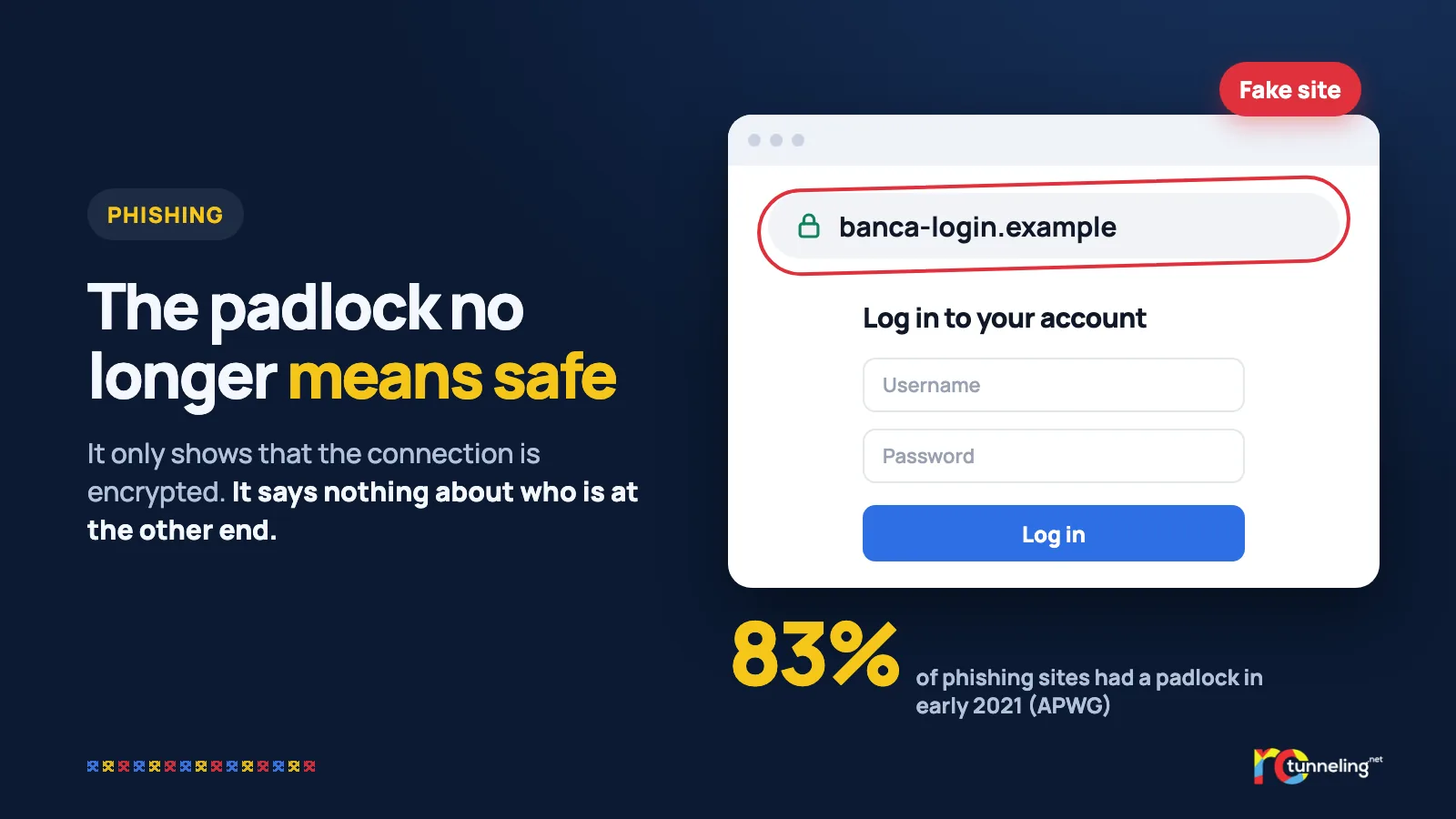
For years we all got the same advice: before you type in your card number, look for the padlock next to the address. It was good advice once. Today, the fake page behind the parcel text message we wrote about last week almost certainly has a padlock too. The padlock only shows that the connection between you and the site is encrypted. It tells you nothing about who is at the other end.
What changed
APWG, the international Anti-Phishing Working Group, has been counting for years how many fake sites use HTTPS, which is what gives them the padlock:
- at the end of 2016, under 5%;
- in the third quarter of 2019, more than two thirds (68%);
- in the first quarter of 2021, 83%.
The reason is simple. The certificate behind the padlock is now free and issued automatically. According to APWG's 2021 report, 94.5% of the certificates used in phishing were of the most basic type, which only confirms that the request comes from whoever controls the domain. Nobody checks who the company is. As early as 2019, APWG wrote that people can no longer rely on the padlock alone to tell whether a site is safe.
The trace every new site leaves
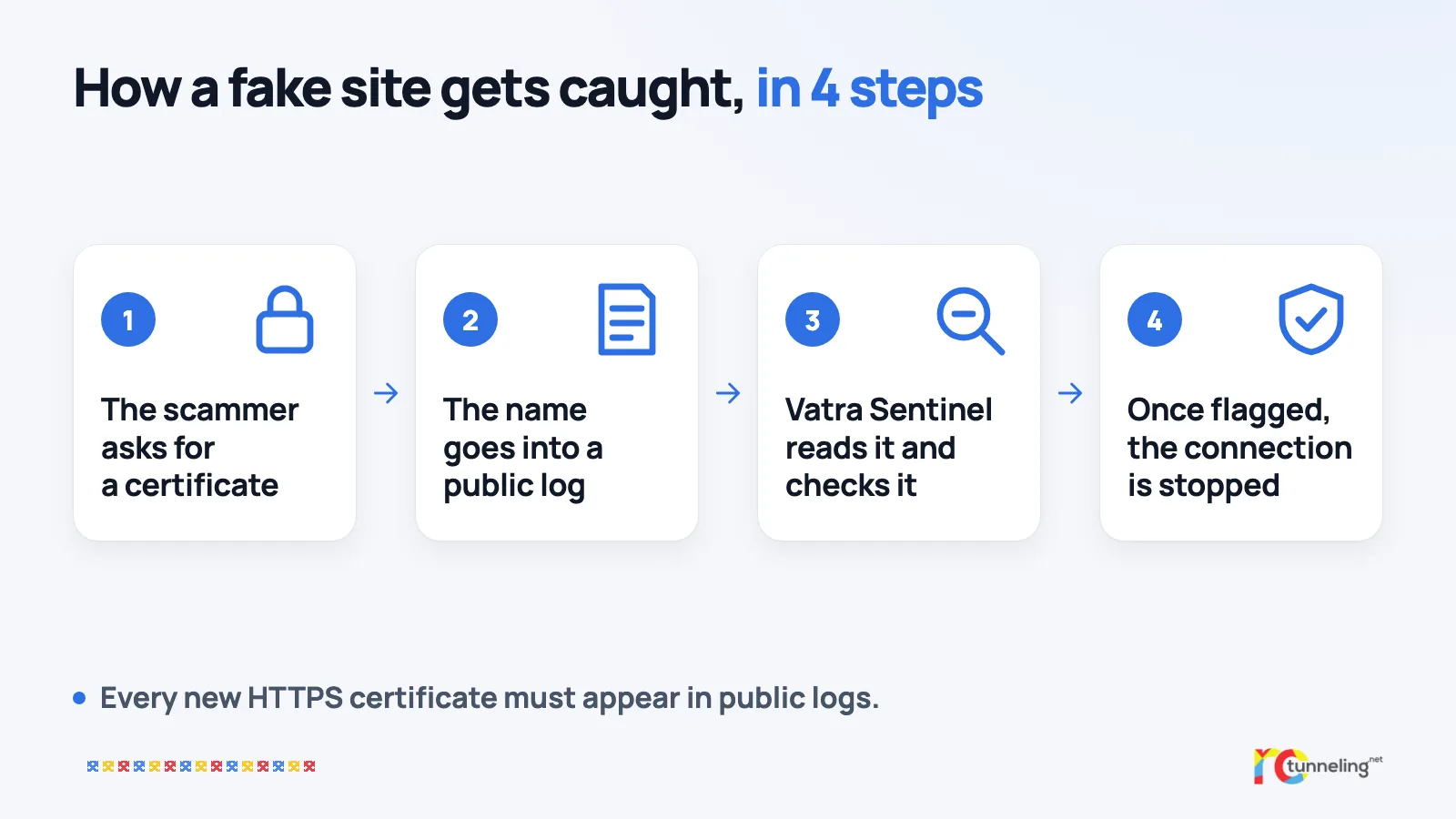
There is, however, a lesser-known rule that works in our favour. Since 2018, the most widely used browser has required every new certificate to be written into public logs, known as Certificate Transparency. Today all major browsers apply the rule. A certificate missing from the logs is rejected, and the site shows an error instead of a padlock.
Think of a public register you can only add to. Nothing gets deleted, nothing gets changed, and anyone can read it. So a scammer who wants a padlock for "banca-login.example" has to write that name into the register before the site will work properly in a browser.
The logs were created so that companies could spot certificates issued in their name without their knowledge. The same register can also be read to catch sites that imitate a bank, a courier or an online shop.
Vatra Sentinel, step by step
Vatra Sentinel is a system developed in Bucharest, built on technology from the company VAKYN, and it does exactly that. Based on the system's public description:
- It reads the public certificate logs in real time, as certificates are issued.
- It compares every new name with a list of watched brands. It also catches the usual tricks: the digit 0 instead of the letter o, look-alike letters from other alphabets, and lure words such as "login", "verify" or "secure" attached to a brand name.
- For suspicious names, it checks how old the domain is, which company registered it and where it is hosted. A domain registered half an hour ago that copies a bank's name already says a lot.
- The riskiest cases go to a decision model. It answers the questions an analyst would ask and says how sure it is of each answer.
- Every flagged name gets a risk level, from low to critical.
According to the press release of 10 November 2026, between 26 October and 10 November the system read more than 6.6 billion log entries and assessed more than 1.3 million suspicious domains, hosted in more than 90 countries and territories. These are the company's own figures and have not been independently verified.
Also on 10 November 2026, Warning.com announced that it had acquired Vatra Sentinel, and VAKYN remains an independent company.
The sources behind the lists of RoTunneling Protect – Malware and Phishing Protection include Vatra Sentinel and national security teams (CERTs) in several countries.
What protects you
- Don't rely on the padlock. Read the whole site name. "banca-login.example" is not your bank's site, even with a padlock.
- Open important sites from your bookmarks or the official app, not from links you received by text, email or chat.
- Use a password manager. It won't fill in your password on a site that only looks like the real one, which is a good sign that something is wrong.
- Turn on a protective DNS, which stops connections to fake sites that are already known.
- If you have already entered your details, call your bank and change your password. In Romania, report the site to DNSC on 1911.
Where protection helps and where it doesn't
A protective DNS can stop a fake site only once it has been flagged. The earlier a site is caught, the fewer people get to open it. That is why sources that see a site from the moment it goes online matter. Still, no protection catches everything: a very new site can slip through, and a phone call that talks you into moving money never goes through a website at all. It reduces the risk. It does not replace your attention or your antivirus.
RoTunneling in short
Protect is on by default in the RoTunneling app while you are connected, and you can turn it off in the settings. If you don't use the VPN, you can get it for free through the RoTunneling Protect DoH address, with no account, on your phone, tablet or computer. The setup guide is at rotunneling.net.
Sources
- APWG, Phishing Activity Trends Report, 4th quarter 2017: https://docs.apwg.org/reports/apwg_trends_report_q4_2017.pdf
- APWG, Phishing Activity Trends Report, 3rd quarter 2019: https://docs.apwg.org/reports/apwg_trends_report_q3_2019.pdf
- APWG, Phishing Activity Trends Report, 1st quarter 2021: https://docs.apwg.org/reports/apwg_trends_report_q1_2021.pdf
- Certificate Transparency, how it works: https://certificate.transparency.dev/howctworks/
- Chromium team announcement on Certificate Transparency enforcement (certificates issued after 30 April 2018): https://groups.google.com/a/chromium.org/g/ct-policy/c/wHILiYf31DE
- MDN, Certificate Transparency in browsers: https://developer.mozilla.org/en-US/docs/Web/Security/Defenses/Certificate_Transparency
- Vatra Sentinel: https://vatra.vakyn.com
- Press release of 10 November 2026 (EIN Presswire): https://www.einpresswire.com/article/955759173/vatra-sentinel-joins-the-warning-com-family-to-fight-brand-impersonation